Anonymity in Mentimeter
Summary
By default, Mentimeter is completely anonymous and feedback from staff and students suggests that anonymity is a highly valued feature of the tool both for staff and students alike. It is now possible to make Mentimeter presentations non-anonymous in both live sessions and in asynchronous uses of Mentimeter, however, and this page provides guidance on anonymity in Mentimeter for those who might be considering the different options available.
Key considerations
Feedback from staff and students suggests that anonymity is an important feature of Mentimeter, encouraging inclusive participation and honest responses, but that this needs to be handled with care to avoid problems such as time-wasting and inappropriate responses to open questions. Click below for details on results related to anonymity from staff and student evaluation surveys since Mentimeter was adopted in 2021.
UoY feedback on anonymity
In evaluation surveys exploring student attitudes and perceptions since Mentimeter was adopted in 2021, anonymity has been identified consistently as a key feature of the tool. In a survey of Biology and Psychology students carried out in the 2022-23 academic year (n=140), anonymity was felt to be the most important feature of all, with respondents unanimously considering it to be moderately, very, or extremely important rather than slightly important of not important at all. This was also the case in surveys of Psychology students in the 2023-24 and 2024-25 academic years (n=56 and 102 students respectively). Open comments highlighted the benefits of anonymity in encouraging responses from a wider range of students without fear of judgement or embarrassment.
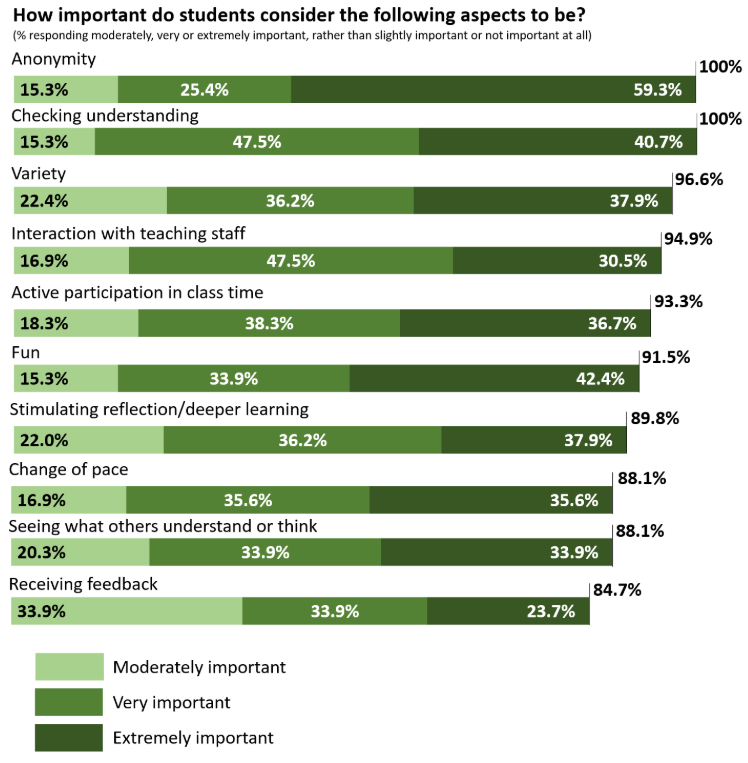
In a student survey completed in January 2026 by 599 Undergraduate students in Psychology, Politics, Economics, Sociology and Language and Linguistic Sciences, it was rated as one of the most important features with 52.7% describing it as extremely important, 22% as very important, 12.9% as moderately important, 7.9% as slightly important and 4.5% describing it as not at all important.
Similarly, in a staff survey carried out in Dec 2025 with open questions asking staff about their uses of Mentimeter completed by 117 users across the departments of Computer Science, Psychology, Sociology, Biology, Language and Linguistic Science, Economics, and History anonymity was the third most commonly reported aspect appreciated by staff with 22 staff specifically referring to its benefits for inclusion. Several staff case studies also outline the benefits of anonymity for inclusivity, for example by increasing the numbers of questions asked in sessions and eliciting responses from a greater range of students.
However, both the staff and student surveys elicited comments that suggest that anonymity needs to be handled carefully to avoid problems. Seven comments from staff referred to the challenges of anonymity including problems with inappropriate responses and the need to work with a colleague to moderate questions coming in during large lectures. Similarly, nine students referred to the negative consequences of anonymity in sessions such as time wasting and embarrassment when inappropriate responses were added to word clouds and open responses.
Staff sometimes report that they feel non-anonymous participation would be beneficial in, for example:
- Encouraging more 'ownership' of student contributions
- Allowing for more 'learning analytics' and individualised feedback
- Avoiding inappropriate responses
These potential benefits may bring drawbacks for inclusion and participation, however, so you may wish to consider other strategies to support learning without needing to resort to non-anonymous use. Including students in decision-making by discussing the benefits and drawbacks of anonymity and polling them on their attitudes and preferences can help to shape your approach and avoid any negative consequences for the learning environment of de-anonymising too quickly or without consultation. It is worth noting that risks of inappropriate responses only apply to open responses. The following page incorporates advice from experienced Mentimeter users on how to approach anonymity and avoid inappropriate use of open responses without resorting to switching off anonymity:
Using open text responses safely and dealing with inappropriate or offensive posts
When considering anonymity, it is worth remembering that there are different options so you can match options to different activities. For example, you could start with anonymous contributions and discuss the goal of moving towards de-anonymised contributions especially in smaller group teaching. You could also de-anonymise on a temporary basis to deal with inappropriate responses before trying again at a later stage, or you could use anonymous engagement in some types of sessions such as large lectures, de-anonymising for other sessions. Remember that it is possible to set things up so that names are shown in the results to everybody, or so that they are only visible to instructors within the Mentimeter results interface and not displayed on results slides.
If, after consulting the advice, you decide you need to switch off anonymity, the options for doing this are available below. Note that students will be informed that they are responding non-anonymously and it is important to ensure that they are clear on the rationale for de-anonymising and that you inform them how their data will be used.
Anonymity in live sessions
There are three different options which can be found under the ‘participant interactivity’ settings within Mentimeter (indicated with a pointing finder icon alongside the editing interface and labeled ‘1’ in the image below):
Participants are required to Log in (2)
Participants names are required (3)
Names are visible to participants (4)
When you adjust these settings, you will be shown a summary of the outcome of selecting each combination of options (5).
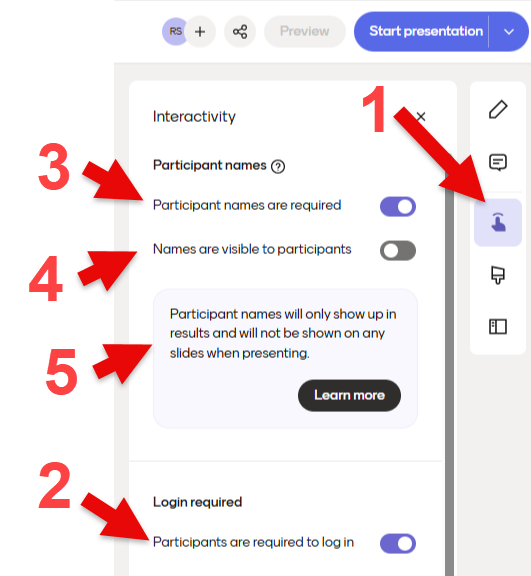
A summary of different options is provided below.
Option 1: Fully anonymous participation (default)
Settings: Require Log-in: OFF| Require Names: OFF | Names Visible: OFF
Option 2: A log-in is required but participation remains anonymous
Settings: Require Log-in: ON | Require Names: OFF | Names Visible: OFF
How it works: Participants log on via the University's single-sign on page (Duo authentication required) so they will need to have an active University of York username and password to join the presentation on their device. Participation remains anonymous but each participant can only submit once.
Best used for: Preventing double-voting or "ballot stuffing" while preserving complete anonymity.
Option 3: No log in is required but participants must give a name to take part
Settings: Require Log-in: OFF | Require Names: ON | Names Visible: OFF
How it works: Participantsmust give a name/pseudonym before joining. Names are linked to responses in the Mentimeter results and are visible to the presentation creator and collaborators, but they are not shown on the results slides and they are not visible to other participants. You can also switch on 'Names are visible to participants' for the results on some question types to be shown in the results.
Best used for: Increasing accountability in situations where you have participants without a University account (nb. names entered are not verified so participants can use pseudonyms to connect). Making it easier to connect responses to individuals in the results when analysing results or giving feedback while still giving the option for students to use a pseudonym to maintain anonymity.
Option 4: A log-in is required and names are visible to creators
Settings: Require Log-in: ON | Require Names: ON | Names Visible: OFF
How it works: Participants will need to log on to take part and only one submission is allowed from each participant once they are logged on. Names are collected with responses and are visible to creators in the results interface within Mentimeter and in the downloaded results, but they are not visible on the presentation slides so cannot be seen by other participants.
Best used for: Allowing staff to identify who made different responses, allowing for more individualised feedback and follow ups. Promoting a greater sense of accountability and ownership in sessions whilst maintaining anonymity between students.
Option 5: A log-in is required and names are visible to everyone
Settings: Require Log-in: ON | Require Names: ON | Names Visible: ON
How it works: Participants will need to log on to take part and only one submission is allowed from each participant once they are logged on. Names are collected with responses and are visible in the results interface within Mentimeter and in the downloaded results. They are also made visible in the results slides for some question types allowing participants to see who made different responses. For example, Q&A questions will show the names in full above each question, while multiple choice questions will show initials and allow names to be seen in full by clicking on the initials.
Best used for: Allowing staff and students to identify who made different responses allowing staff to give more individualised feedback and follow ups, whilst also allowing for this information to be included in student activities where students feel comfortable to share their responses with each other. Promoting a full sense of accountability and ownership in sessions.
See the following Mentimeter help pages for further information about the verified participation options and for some further example use cases.
Anonymity in asynchronous uses of Mentimeter
The anonymity options described above are also available for asynchronous uses of Mentimeter, and the Blackboard Mentimeter LTI is the recommended method for including menti questions in your Ultra VLE sites. For more information, please see the Asynchronous use of Mentimeter page.