Organise and reuse your Mentimeter presentations
Summary
Organising and resusing your Mentimeter presentations.
Organise your presentations
You can organise your Mentimeter presentations in folders and sub folder (up to 4 levels). This allows you to organise your presentations in a way that best works for you, eg. you could have a folder for each academic year with sub-folders for different modules. Folders can be shared with others to allow straightforward sharing of module materials between different members of the teaching team.
Reuse presentations
Duplicate a presentation
In most cases, the recommended method of reusing a presentation for teaching is to duplicate it. This will create a 'clean copy' of your presentation keeping the results from the last time the presentation was delivered visible within the copied Menti so that you can view them immediately from the presentation view, download them in all formats, and use the AI assistant to analyse the results (Using AI in Mentimeter).
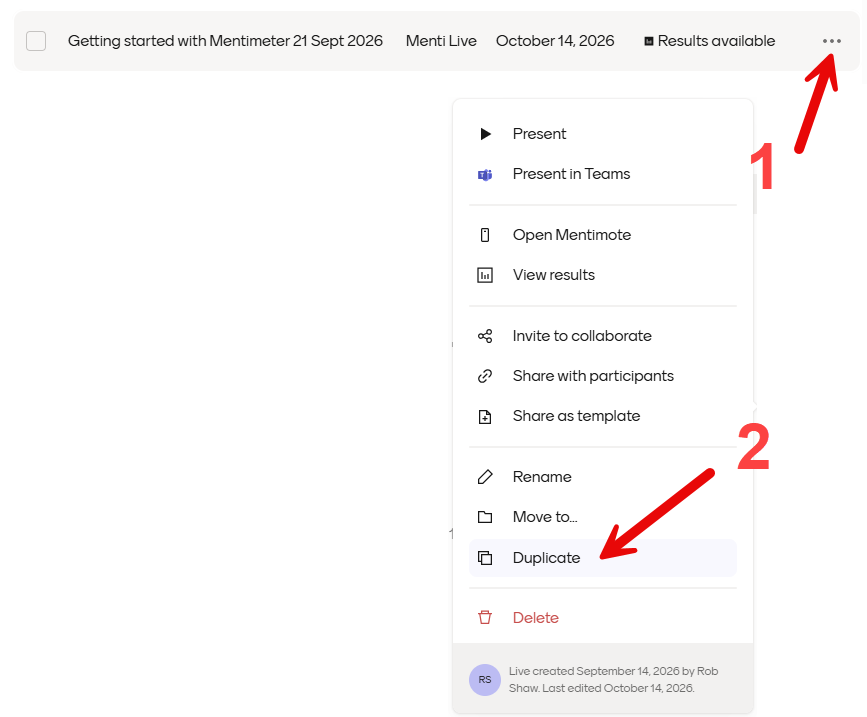
You can duplicate a presentation from the 'My Mentis' page, choosing the menu alongside the presentation you would like to reuse and selecting 'Duplicate'.
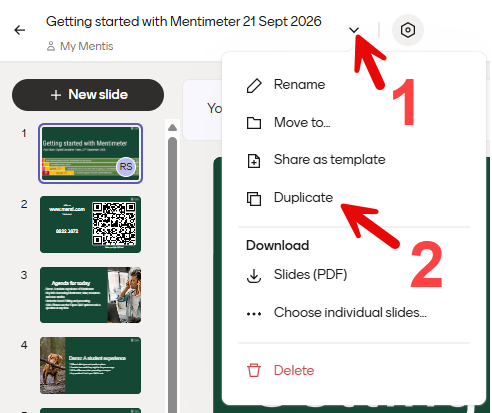
You can also duplicate an open presentation by selecting 'Duplicate' from the presentation options menu.
Clear results
It is also possible to clear results in order to deliver the same Mentimeter presentation again. This will create a new 'session' within the Menti and make the results of previous sessions 'read only'. Results from previous sessions can be downloaded in Excel format and you can also view them from within the Mentimeter presentation using the 'Sessions history' option. You can also view results from previous sessions via the results page and, for presentations with scales questions, you can compare results from different sessions over time using the 'Show trends' option. However, results from older sessions are no longer immediately visible in presentation view so they can no longer be seen in in shared Mentimeter presentations. It is only possible to use grouping of open responses and the AI-produced summary of results with the results from the most recent session.